
Yes, it is possible to filter the entities by its parents. Follow the below steps:
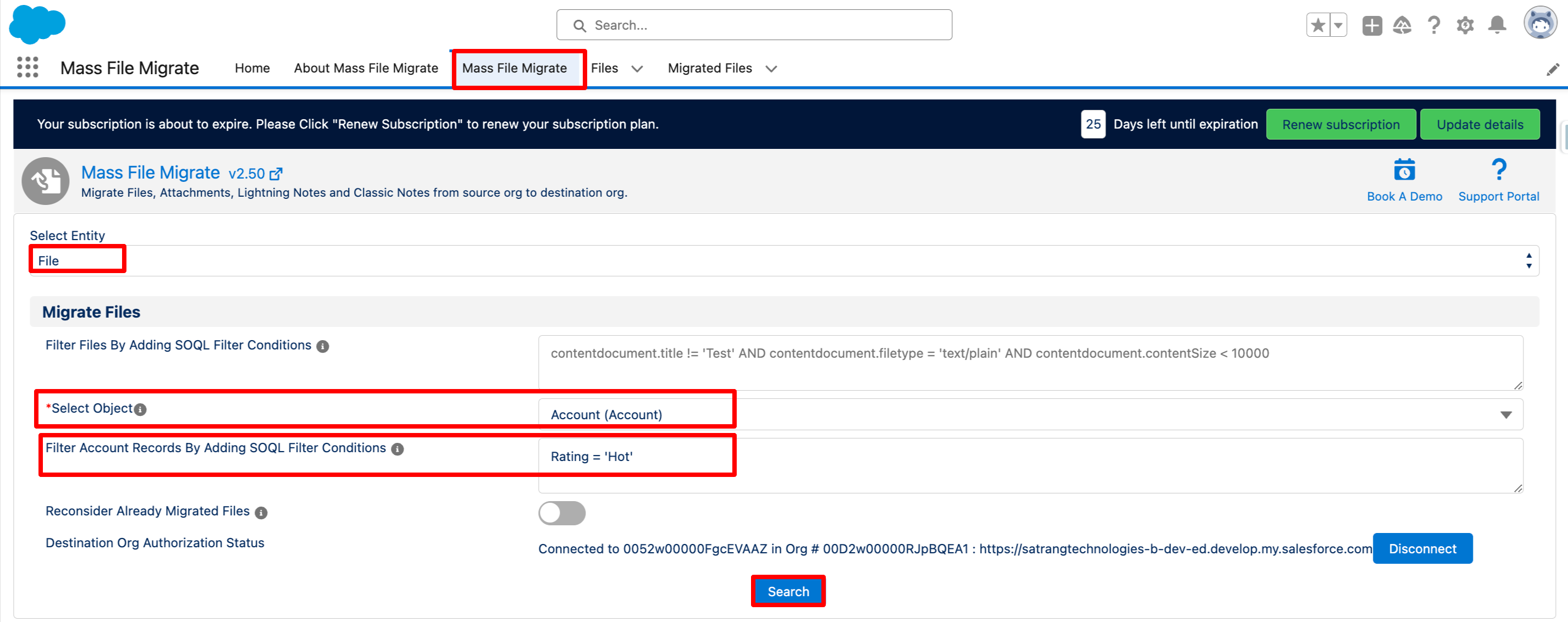
- Navigate to the Mass File Migrate app and select the "Mass File Migrate" tab.
- In the "Select Entity" dropdown, choose File, Attachment, Lightning Note, or Classic Note.
- Select the object from which you want to migrate the entity.
- In "Filter records by adding SOQL filter conditions," add the query to filter your entities by parent records.
- Click on the "Search" button.
Note - For attachments and Classic Note this feature will only be available if a single object is selected.
With this filter, only the entities belonging to filtered parent records will be shown in the table, simplifying the selection process before migration.
PS: View Mass File Migrate Salesforce file migration app on Salesforce AppExchange:
https://appexchange.salesforce.com/appxListingDetail?listingId=e9874a66-2001-4e3d-8a29-3a2ed7f584c4