
Yes, you can hide the Advanced Search (SOQL) Search Mode for Records and Libraries by following the steps below:
- Go to Mass File Upload App:
- Open the Mass File Upload app from the app launcher.
- Navigate to the About Mass File Upload Tab:
- Click on the About Mass File Upload tab.
- Access Screen Settings:
- In the Mass File Upload Screen Settings section, locate the toggles for:
- "Hide Advanced Search (SOQL) Search Mode for Records"
- "Hide Advanced Search (SOQL) Search Mode for Libraries"
- In the Mass File Upload Screen Settings section, locate the toggles for:
- Turn ON the Toggles:
- Turn ON the toggles for both "Hide Advanced Search (SOQL) Search Mode for Records" and "Hide Advanced Search (SOQL) Search Mode for Libraries."
- Save the Settings:
- Click on the "Save" button.
- A success message will appear on the screen.


- With these settings in place, the Advanced Search (SOQL) mode will be hidden from the Records and Libraries tabs.
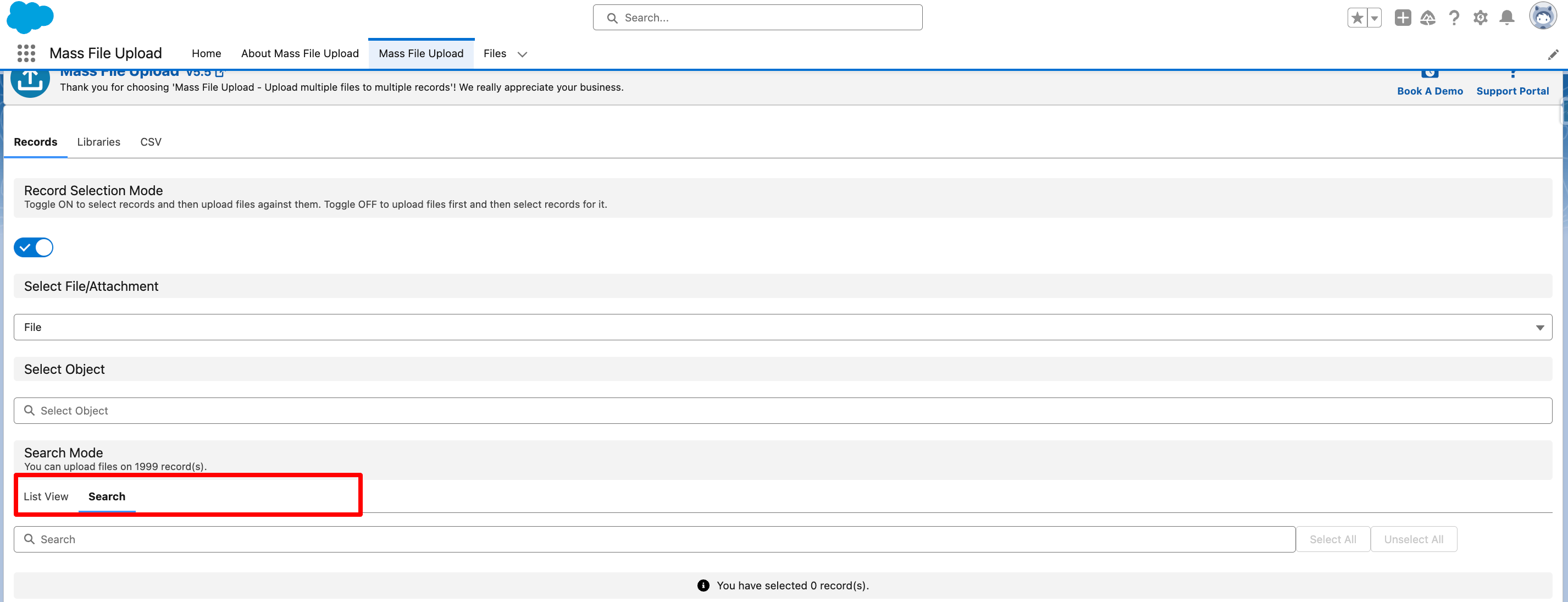
PS: View Mass File Upload, Salesforce file upload app on Salesforce AppExchange: https://appexchange.salesforce.com/appxListingDetail?listingId=82cf236b-1ee8-4ea7-aebf-fd0c89fb93bd