
The Drag, Drop & Upload Files to Amazon S3 app has built-in file-name versioning. When multiple files with the same name are uploaded to the same parent record, the app automatically creates versioned file names so no file is overwritten.
In the v10.0 release, we added an admin option to disable this behavior if you prefer to keep original file names (not recommended unless you have a specific reason).
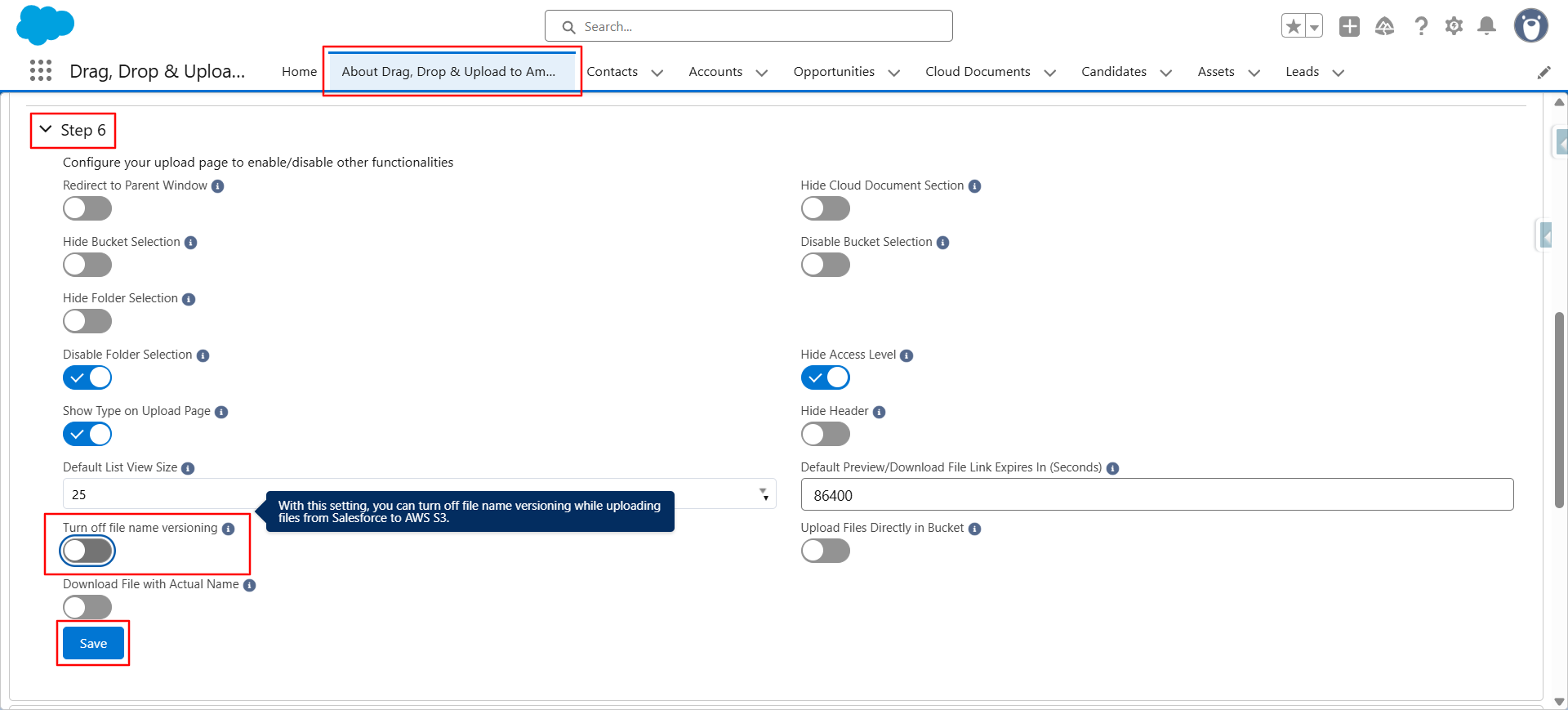
To disable file-name versioning (admins):
- Go to the ‘About Drag, Drop & Upload Files to Amazon S3’ tab.
- Scroll down and click on Step 6.
- In this setting, turn OFF the ‘Turn Off File Name Versioning’ toggle.
If you Turn ON this toggle, file-name versioning will be disabled.
In this case, when a file with the same name is uploaded again, the existing file will be overwritten, and the new file will replace it. No versioning will occur. - Click Save.
Now, whenever you upload files with the same name, the app will automatically create versions. The versioned file names will appear like this:

PS: View Drag, Drop & Upload Files to Amazon S3, a Salesforce AppExchange app for moving files from Salesforce to Amazon S3: https://appexchange.salesforce.com/appxListingDetail?listingId=a0N3000000B5ZPqEAN