Logo

Satrang Technologies

Welcome
Login  Sign up
Home Solutions
New support ticket
Check ticket status
+919820436966
Solution home Mass File Download FAQs

How to create Mass File Download List View button? Print

Modified on: Tue, 10 Feb, 2026 at 2:54 PM


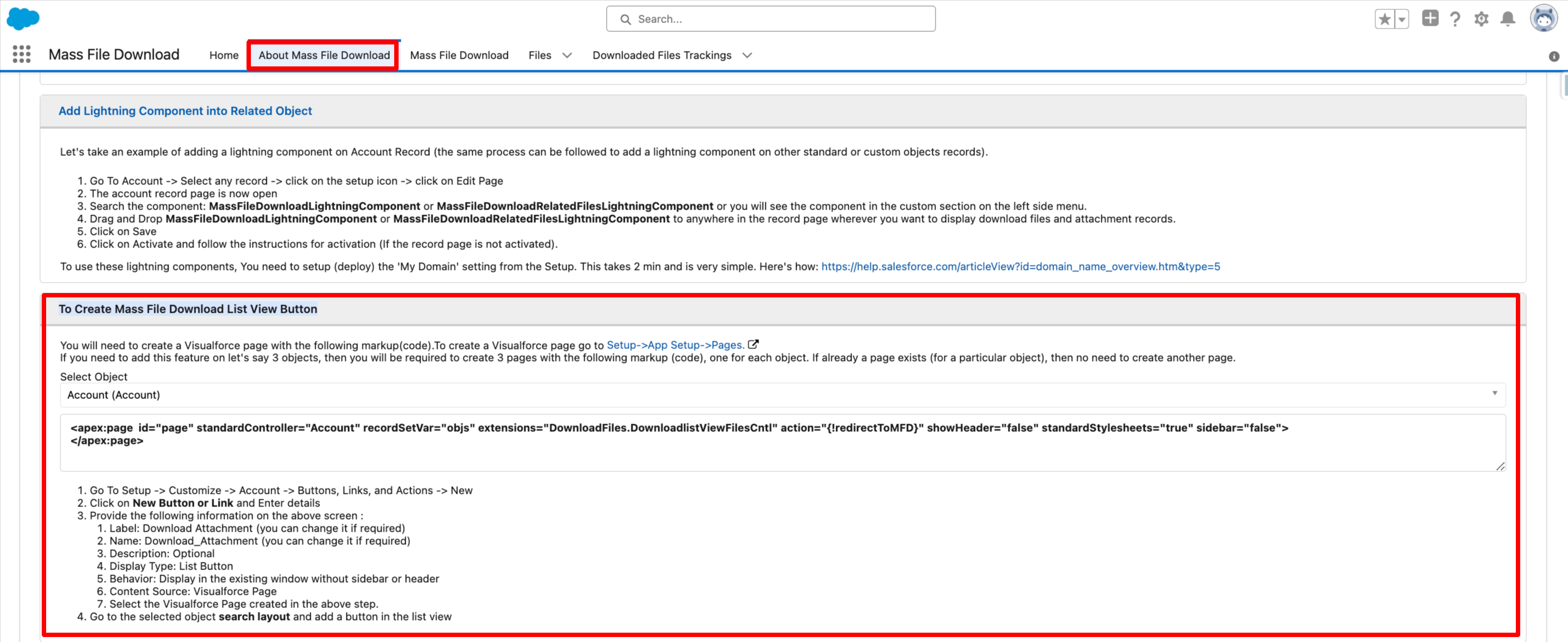
To create the Mass File Download List View button, follow these steps:

  • Go to the "About Mass File Download" Tab.
  • Under the "To Create Mass File Download List View Button" section, follow all the steps provided.

PS: View Mass File Download, Salesforce file download app on Salesforce AppExchange: https://appexchange.salesforce.com/appxListingDetail?listingId=a0N3A00000EcsAOUAZ


Did you find it helpful? Yes No

Send feedback
Sorry we couldn't be helpful. Help us improve this article with your feedback.

Related Articles

    Home Solutions
    Article views count