
The INVALID_SESSION_ID error occurs due to API Access Control settings restricting API access for Visualforce pages. To resolve this issue, update the API Access Control settings as follows:
- For admin-approved users, limit API access to only allowlisted connected apps → Keep this enabled (already enabled in your org, which is why you encounter this error).
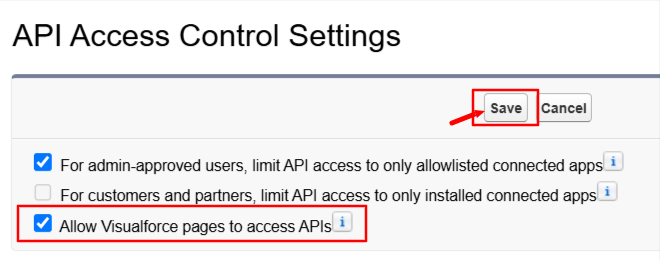
- Allow Visualforce pages to access APIs → Enable this setting.
Once this configuration is applied, users should no longer encounter the INVALID_SESSION_ID error when downloading files.
Follow these steps:
- Click the Gear Icon and select Setup.
- In the Quick Find box, search for API Access Control and open it.
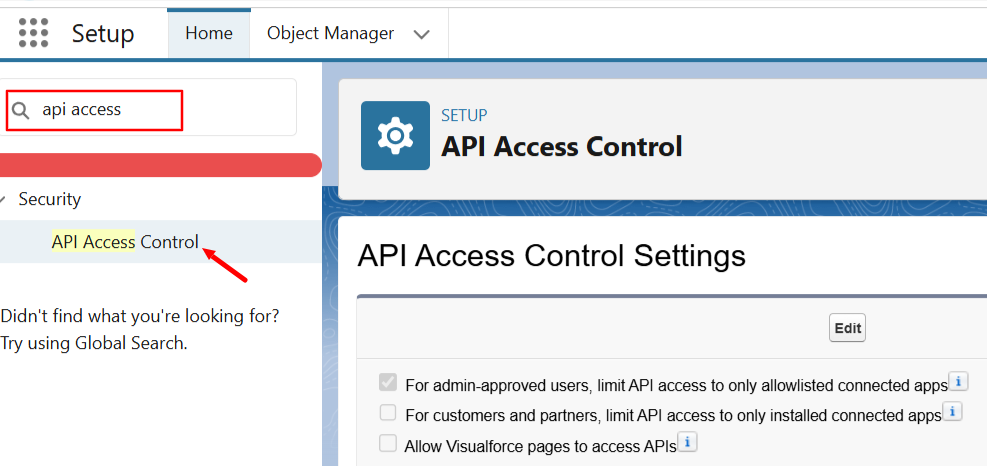
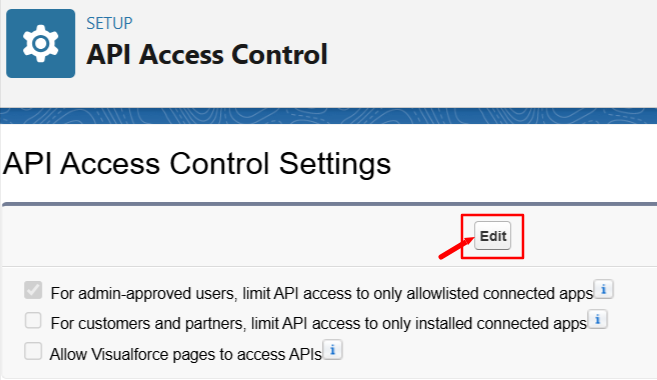
3. Click the Edit button.
4. Check the Allow Visualforce pages to access APIs checkbox and click Save.
Detailed Comparison of Settings
| Mass File Download App | API Access Control Settings → For admin-approved users, limit API access to only allowlisted connected apps is Enabled | API Access Control Settings → For admin-approved users, limit API access to only allowlisted connected apps and Allow Visualforce pages to access APIs both are Enabled | API Access Control Settings → For admin-approved users, limit API access to only allowlisted connected apps is Enabled and Profile level - System Permissions ----> Use Any API Client is Enabled (Not Recommended) |
|---|---|---|---|
| MFD Tab | Not Working | Working Fine | Working Fine |
| Mass File Download Lightnign Component | Not Working | Working Fine | Working Fine |
| MFD Related Files | Not Working | Working Fine | Working Fine |
| LWC Component(Record Details Page Component) | Working Fine | Working Fine | Working Fine |
| MFD Lightnign Tab | Working Fine | Working Fine | Working Fine |
This table helps in understanding the impact of different settings on the functionality of the Mass File Download app.
PS: View Mass File Download, Salesforce file download app on Salesforce AppExchange: https://appexchange.salesforce.com/appxListingDetail?listingId=a0N3A00000EcsAOUAZ